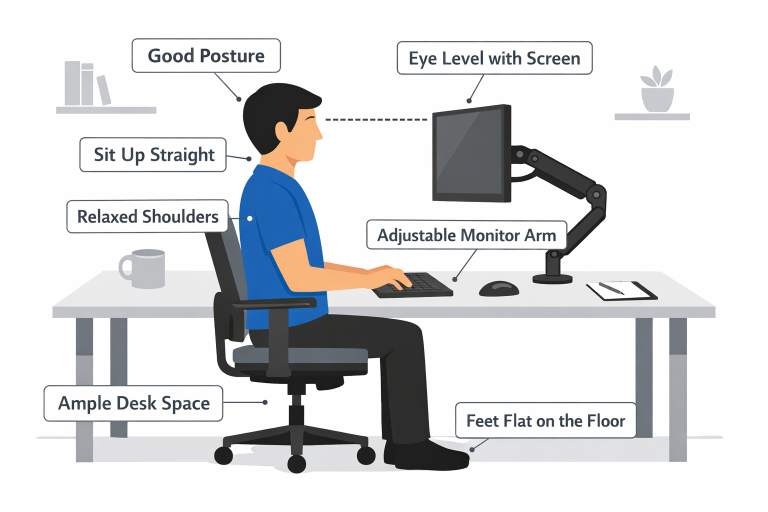
Ergonomics is the science of designing environments to fit the people who use them, and its principles are increasingly important in modern offices. A well-adjusted workspace helps prevent discomfort, fatigue, and long-term health issues such as eye strain and musculoskeletal disorders. One vital aspect of an ergonomic office setup is the position and adjustment capabilities of your monitor.
For many professionals, investing in monitor mounts offers a practical way to optimize comfort and productivity. By creating a workstation that adapts to your unique needs, you can work longer and more comfortably.
Improper monitor placement often leads to awkward body positioning and strains muscles in your neck, shoulders, and back. Over time, this can contribute to chronic discomfort and reduced overall efficiency. The right tools not only support good health but also promote a more efficient work environment, minimizing clutter and poor posture.
Many organizations are now prioritizing ergonomic improvements in the workplace, understanding that healthier employees are typically more focused and satisfied with their work. Focusing on posture and comfort pays off in both the short and long term, fostering a more positive work atmosphere and reducing time lost to preventable injuries.
Key Takeaways
- Proper monitor positioning can significantly reduce neck and back strain.
- Monitor mounts free up desk space, promoting a cleaner and more organized workspace.
- Adjustable monitor arms support better posture and can enhance productivity.
How Monitor Mounts Enhance Ergonomic Workspaces
Monitor mounts are essential for creating an adaptable, health-conscious workstation. Adjustable monitor arms provide several benefits, ensuring that computer screens are set to the most ergonomic height and angle for each user. By aligning monitors at eye level, these mounts prevent the neck from bending or craning, promoting a natural, upright posture.
This equipment is particularly important in offices with shared or hot-desking arrangements, where different team members may use the same station. Users can quickly personalize their setup to fit their body, minimizing time spent adjusting and maximizing comfort throughout the day. Furthermore, adjusting your monitor can help reduce glare and eye strain, making it easier to focus on critical tasks.
Health benefits aside, flexible monitor mounts also encourage a more visually organized workspace, making it easier to keep your desk neat and orderly. This combination of form and function leads to a more pleasant and productive office environment. For more on general ergonomics and workplace health, resources like the CDC’s guide to ergonomics are invaluable for deepening your understanding of how to create a safe and supportive workspace.
Benefits of Using Monitor Mounts
- Improved Posture: When monitors are placed at the right height, users naturally sit with their shoulders back and spine straight. This reduces habits like slouching or craning forward, protecting spinal health over time.
- Increased Desk Space: Elevating screens clears surface area on your desk, providing room for other essentials and creating a tidier, more efficient workspace.
- Enhanced Productivity: Customized monitor placement supports an ergonomic posture, reducing fatigue and making it easier to stay focused for longer periods. Comfortable employees tend to be more attentive and able to maintain consistent output.
Monitor mounts also offer benefits for users of dual or multiple monitors. They enable seamless movement and alignment, making tasks such as referencing documents or coding more streamlined. This ease of motion is a significant productivity advantage for professionals in fields such as design, finance, and software development.
Choosing the Right Monitor Mount
There are several factors to consider when selecting a monitor mount. Begin by ensuring the mount supports the weight and dimensions of your screen, as incorrect sizing can compromise stability and safety. Next, look for models with broad adjustability, including tilt, rotation, and height movement, to customize your viewing experience.
- Compatibility: Check your monitor’s VESA mount pattern and weight guidelines to ensure a secure fit. Most mounts will specify supported monitor dimensions and mounting patterns.
- Adjustability: Multiple pivot points and simple, tool-free adjustments allow you to refine monitor placement based on your needs and preferences quickly.
- Installation: Choose between desk-mounted and wall-mounted designs based on your available space and office layout. Desk clamps are common for most modern offices, while wall mounts may suit more permanent workstations or areas with limited surface space.
Implementing Monitor Mounts in Your Workspace
Start by assessing your individual requirements. If you use more than one monitor or frequently switch between tasks, consider a dual or multi-monitor arm for added flexibility. Once you have selected the right monitor mount, follow the manufacturer’s instructions closely, ensuring each piece is securely and safely attached.
- Assess Your Needs: Evaluate your work habits, the number of screens you use, and any specific ergonomic goals.
- Follow Installation Guidelines: Refer to the product manual or seek professional assistance if needed, particularly for wall-mounted options. Proper installation safeguards your equipment and personal safety.
- Adjust for Comfort: Once installed, set the monitor at eye level, generally about 20 to 30 inches from your eyes, and make fine adjustments for your comfort. The goal is to look straight ahead at your screen, with your neck and shoulders relaxed.
Additional Ergonomic Considerations
While monitor mounts play a crucial role, a truly ergonomic workspace goes beyond a properly positioned screen. Adjustable chairs, keyboard trays, and footrests are all valuable additions. Each element should be tailored to the user and complement the monitor arms’ flexibility. Lighting, room temperature, and regular movement breaks also contribute to comfort and well-being at work.
For a broader overview of optimizing your work environment, check out the insights that cover everything from desk setups to simple, daily adjustments that can make a significant difference.
Conclusion
Adding a quality monitor mount to your workstation is a practical, impactful step toward a healthier and more comfortable work life. By improving posture, freeing up desk space, and reducing physical strain, monitor arms help foster better habits and enhanced productivity. Invest the time and resources in establishing an ergonomic setup now, and you will reap the benefits for years to come.